Connect AI Squared to an OpenAI Compatible Endpoint
This guide will help you configure the OpenAI Compatible Endpoint Connector in AI Squared to access any OpenAI-compatible API endpoint, such as OpenAI itself, self-hosted models, or third-party providers that implement the OpenAI API spec.Prerequisites
Before proceeding, ensure you have:- The endpoint URL of the OpenAI-compatible API you want to connect to.
- A valid API key for that endpoint.
Step-by-Step Guide to Connect to an OpenAI Compatible Endpoint
Step 1: Obtain Your Endpoint URL
Identify the URL of the OpenAI-compatible API you want to use. The connector sends requests to this exact URL, so it must be the full chat completions endpoint path.- For OpenAI, use
https://api.openai.com/v1/chat/completions. - For self-hosted or third-party providers, use the URL documented by that provider (for example,
https://your-host.example.com/v1/chat/completions).
The connector uses the URL configured on the source. Make sure the URL points to a chat completions endpoint that follows the OpenAI API spec.
Step 2: Obtain Your API Key
If you are connecting to OpenAI, follow these steps to retrieve your API key:- Sign in to your Open AI account at Open AI.
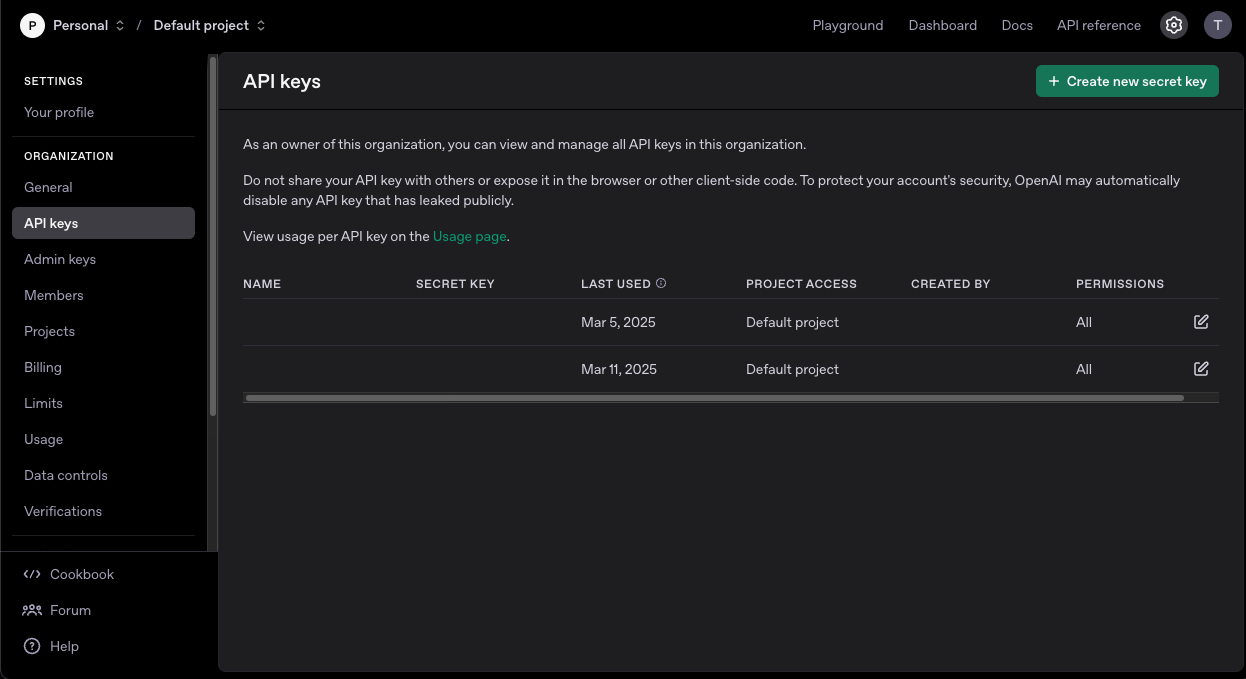
- Click the gear icon on the top right corner.
- Click on “API keys” to view your API keys.
- If you haven’t created an API Key before, click on “Create new secret key” to generate a new one. Make sure to copy the API Key as they are shown only once.