> ## Documentation Index
> Fetch the complete documentation index at: https://docs.squared.ai/llms.txt
> Use this file to discover all available pages before exploring further.
# Firecrawl
## Connect AI Squared to Firecrawl
This guide will help you configure the Firecrawl Connector in AI Squared to access and transfer data from your selected Web page.
### Prerequisites
Before proceeding, ensure you have the required API key from your Firecrawl account.
## Step-by-Step Guide to Connect to Firecrawl.
## Step 1: Navigate to Firecrawl
Start by logging into your Firecrawl Account.
1. Sign in to your Firecrawl account at [Firecrawl](https://www.firecrawl.dev/signin/password_signin).
## Step 2: Locate Firecrawl Configuration Details
Once you're in your Firecrawl account, you'll find the necessary configuration details:
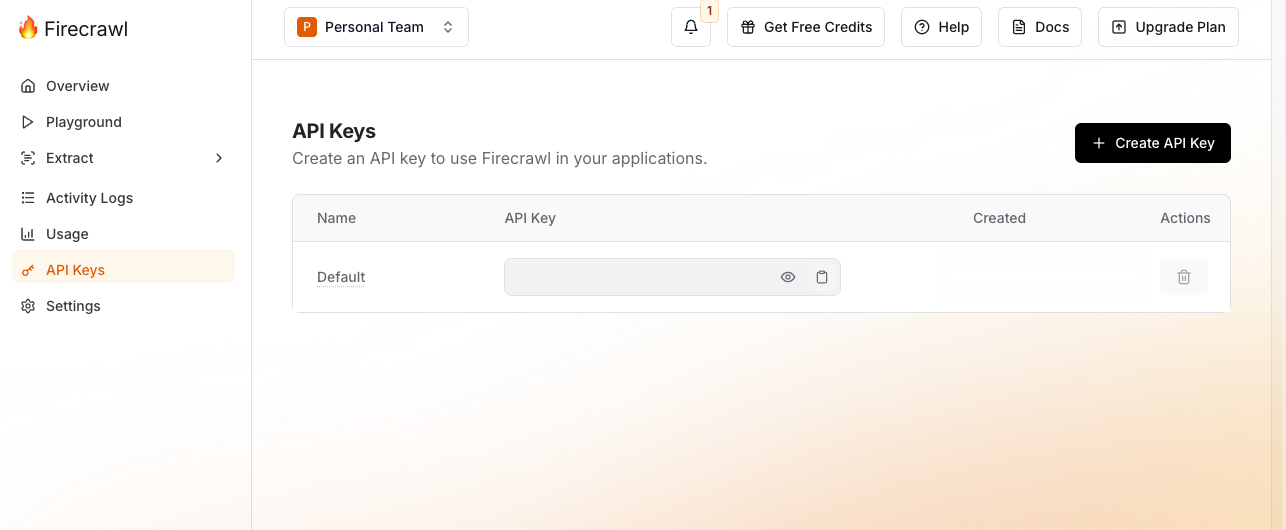
1. **API key:**
* Click the **API Keys** tab on the left side of the Firecrawl dashboard
 ## Step 3: Configure Firecrawl Connector in Your Application
Now that you have gathered all the necessary details, enter the following information in your application:
* **API Key:** Your personal authentication token used to access the Firecrawl API.
* **Base URL:** The root URL of the website or domain you want Firecrawl to scrape (e.g., [https://docs.squared.ai](https://docs.squared.ai)).
## Step 4: Test the Firecrawl Connection
After configuring the connector in your application:
1. Save the configuration settings.
2. Test the connection to Firecrawl from your application to ensure everything is set up correctly.
3. Run a test query or check the connection status to verify successful connectivity.
Your Firecrawl connector is now configured and ready to scrape data from your selected Web page.
## Supported sync modes
| Mode | Supported (Yes/No/Coming soon) |
| ---------------- | ------------------------------ |
| Incremental sync | YES |
## Step 3: Configure Firecrawl Connector in Your Application
Now that you have gathered all the necessary details, enter the following information in your application:
* **API Key:** Your personal authentication token used to access the Firecrawl API.
* **Base URL:** The root URL of the website or domain you want Firecrawl to scrape (e.g., [https://docs.squared.ai](https://docs.squared.ai)).
## Step 4: Test the Firecrawl Connection
After configuring the connector in your application:
1. Save the configuration settings.
2. Test the connection to Firecrawl from your application to ensure everything is set up correctly.
3. Run a test query or check the connection status to verify successful connectivity.
Your Firecrawl connector is now configured and ready to scrape data from your selected Web page.
## Supported sync modes
| Mode | Supported (Yes/No/Coming soon) |
| ---------------- | ------------------------------ |
| Incremental sync | YES |