> ## Documentation Index
> Fetch the complete documentation index at: https://docs.squared.ai/llms.txt
> Use this file to discover all available pages before exploring further.
# Azure AKS (Kubernetes)
## Deploying Multiwoven on Azure Kubernetes Service (AKS)
This guide will walk you through setting up Multiwoven on AKS. We'll cover configuring and deploying an AKS cluster after which, you can refer to the Helm Charts section of our guide to install Multiwoven into it.
**Prerequisites**
* An active Azure subscription
* Basic knowledge of Kuberenetes and Helm
**Note:** AKS clusters are not free. Please refer to [https://azure.microsoft.com/en-us/pricing/details/kubernetes-service/#pricing](https://azure.microsoft.com/en-us/pricing/details/kubernetes-service/#pricing) for current pricing information.
**1. AKS Cluster Deployment:**
1. **Select a Resource Group for your deployment:**
* Navigate to your Azure subscription and select a Resource Group or, if necessary, start by creating a new Resource Group.


 2. **Initiate AKS Deployment**
* Select the **Create +** button at the top of the overview section of your Resource Group which will take you to the Azure Marketplace.
* In the Azure Marketplace, type **aks** into the search field at the top. Select **Azure Kuberenetes Service (AKS)** and create.
2. **Initiate AKS Deployment**
* Select the **Create +** button at the top of the overview section of your Resource Group which will take you to the Azure Marketplace.
* In the Azure Marketplace, type **aks** into the search field at the top. Select **Azure Kuberenetes Service (AKS)** and create.
 3. **Configure your AKS Cluster**
* **Basics**
* For **Cluster Preset Configuration**, we recommend **Dev/Test** for Development deployments.
* For **Resource Group**, select your Resource Group.
* For **AKS Pricing Tier**, we recommend **Standard**.
* For **Kubernetes version**, we recommend sticking with the current **default**.
* For **Authentication and Authorization**, we recommend **Local accounts with Kubernetes RBAC** for simplicity.
3. **Configure your AKS Cluster**
* **Basics**
* For **Cluster Preset Configuration**, we recommend **Dev/Test** for Development deployments.
* For **Resource Group**, select your Resource Group.
* For **AKS Pricing Tier**, we recommend **Standard**.
* For **Kubernetes version**, we recommend sticking with the current **default**.
* For **Authentication and Authorization**, we recommend **Local accounts with Kubernetes RBAC** for simplicity.


 * **Node Pools**
* Leave defaults
* **Node Pools**
* Leave defaults

 * **Networking**
* For **Network Configuration**, we recommend the **Azure CNI** network configuration for simplicity.
* For **Network Policy**, we recommend **Azure**.
* **Networking**
* For **Network Configuration**, we recommend the **Azure CNI** network configuration for simplicity.
* For **Network Policy**, we recommend **Azure**.

 * **Integrations**
* Leave defaults
* **Integrations**
* Leave defaults
 * **Monitoring**
* Leave defaults, however, to reduce costs, you can uncheck **Managed Prometheus** which will automatically uncheck **Managed Grafana**.
* **Monitoring**
* Leave defaults, however, to reduce costs, you can uncheck **Managed Prometheus** which will automatically uncheck **Managed Grafana**.

 * **Advanced**
* Leave defaults
* **Advanced**
* Leave defaults
 * **Tags**
* Add tags if necessary, otherwise, leave defaults.
* **Tags**
* Add tags if necessary, otherwise, leave defaults.
 * **Review + Create**
* If there are validation errors that arise during the review, like a missed mandatory field, address the errors and create. If there are no validation errors, proceed to create.
* Wait for your deployment to complete before proceeding.
4. **Connecting to your AKS Cluster**
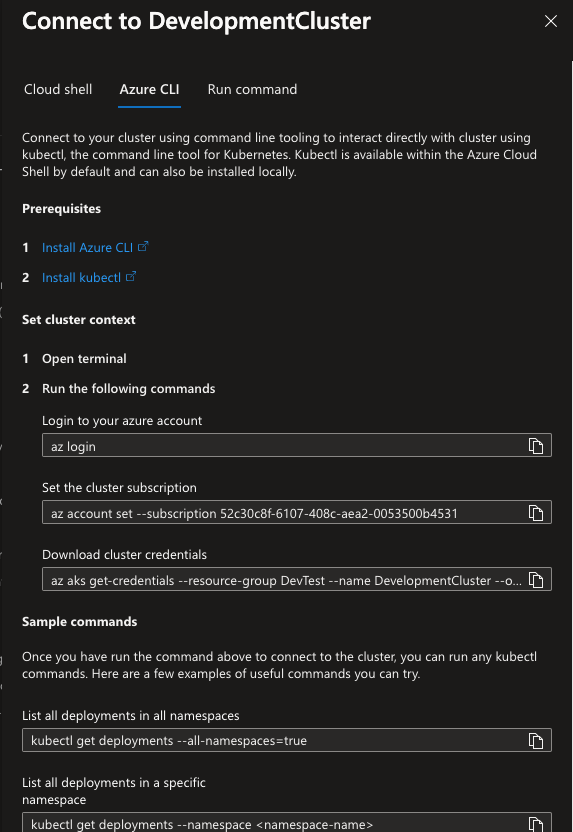
* In the **Overview** section of your AKS cluster, there is a **Connect** button at the top. Choose whichever method suits you best and follow the on-screen instructions. Make sure to run at least one of the test commands to verify that your kubectl commands are being run against your new AKS cluster.
* **Review + Create**
* If there are validation errors that arise during the review, like a missed mandatory field, address the errors and create. If there are no validation errors, proceed to create.
* Wait for your deployment to complete before proceeding.
4. **Connecting to your AKS Cluster**
* In the **Overview** section of your AKS cluster, there is a **Connect** button at the top. Choose whichever method suits you best and follow the on-screen instructions. Make sure to run at least one of the test commands to verify that your kubectl commands are being run against your new AKS cluster.

 5. **Deploying Multiwoven**
* Please refer to the **Helm Charts** section of our guide to proceed with your installation of Multiwoven!\
[Helm Chart Deployment Guide](https://docs.squared.ai/open-source/guides/setup/helm)
5. **Deploying Multiwoven**
* Please refer to the **Helm Charts** section of our guide to proceed with your installation of Multiwoven!\
[Helm Chart Deployment Guide](https://docs.squared.ai/open-source/guides/setup/helm)