> ## Documentation Index
> Fetch the complete documentation index at: https://docs.squared.ai/llms.txt
> Use this file to discover all available pages before exploring further.
# Headless Extension
The **Headless Extension** is a lightweight Chrome extension package that allows advanced users to run AI models directly on webpages without embedding anything in the page itself. This is ideal for internal use cases where you want automation, harvesting, or insight overlay without platform and closed environments.
This guide walks through the steps to enable, install, and run `.air` model files via the headless mode.
## Enable the Headless Extension
1. Go to **Settings > Organization > Headless** tab.
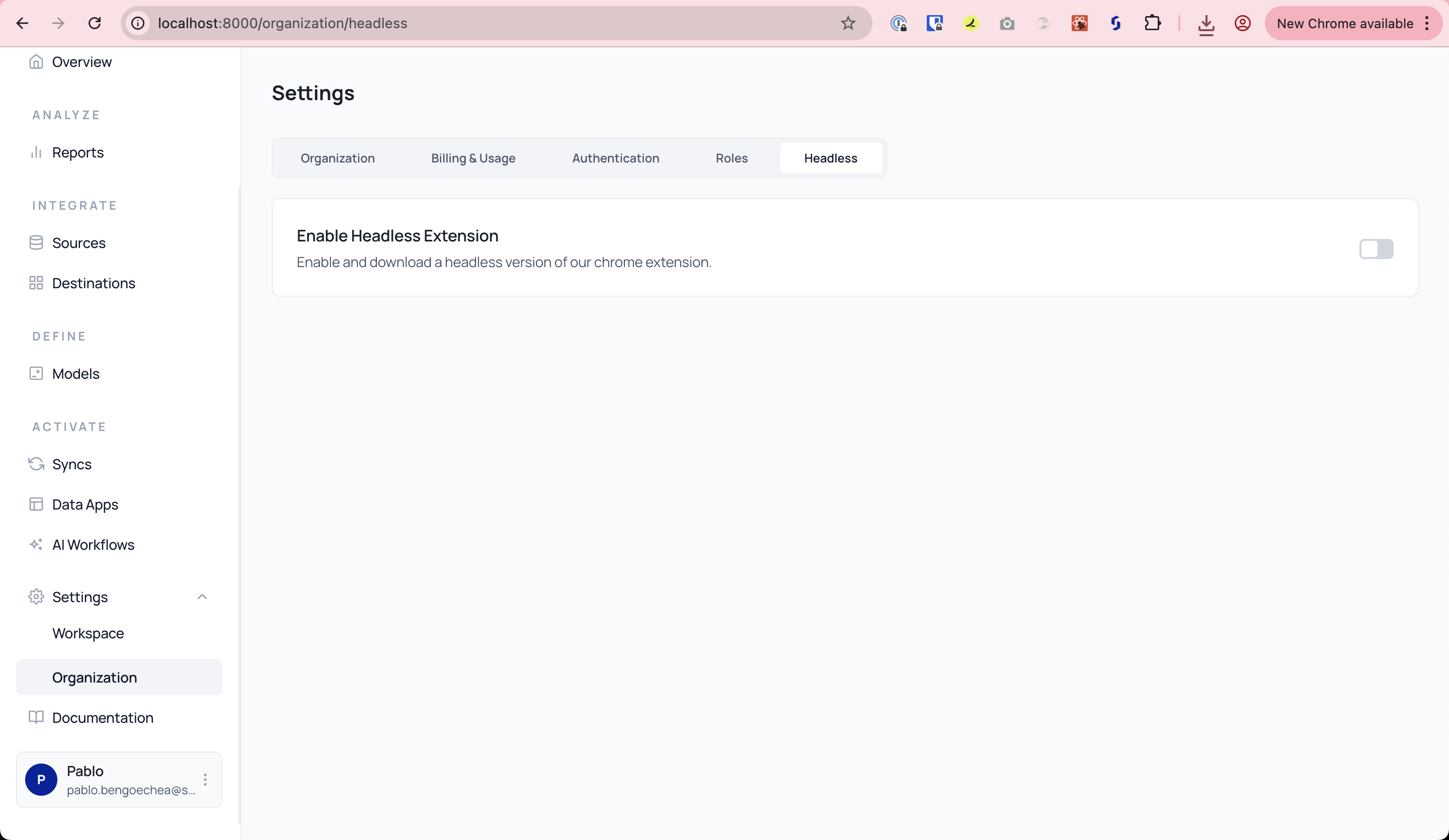 2. Toggle **Enable Headless Extension** to ON.
## Install the Headless Chrome Extension
> The Headless Extension must be installed in Developer Mode.
### Step 1: Download Extension
* Click the download link to get the `.zip` file.
### Step 2: Unzip and Prepare
* Extract the contents of the `.zip` file to a local folder.
### Step 3: Load as Unpacked Extension
1. Open Chrome and navigate to: `chrome://extensions`
2. Enable **Developer Mode** (top right)
3. Click **Load Unpacked** and select the extracted folder (must include `manifest.json`)
***
## Upload an AIR File
To run a model, you need to upload a valid `.air` file to the extension.
1. Open the extension (puzzle icon → AI Squared)
2. Click the **settings gear** ⚙️
3. Use the **Upload Model Card** view to drag/drop or browse for your `.air` file
***
## Run the Model
Once uploaded:
1. You’ll see your model listed as a **Model Card** (e.g. *Building Damage Detector*)
2. Click **Run** to activate it on the current page
3. The extension will display the results inline or in a results panel
***
Watch the complete demo video for headless extension setup
## ✅ You're Done!
Once set up, the extension will:
* Load the `.air` model automatically (if Auto Run is enabled)
* Harvest insights from the active tab based on the model logic
* Show results directly in the browser
You can manage, re-upload, or delete model cards anytime from the extension settings.
***
## File Format
* Supported: `.air` model files
* Make sure `manifest.json` is at the root of the extension folder when loading
***
2. Toggle **Enable Headless Extension** to ON.
## Install the Headless Chrome Extension
> The Headless Extension must be installed in Developer Mode.
### Step 1: Download Extension
* Click the download link to get the `.zip` file.
### Step 2: Unzip and Prepare
* Extract the contents of the `.zip` file to a local folder.
### Step 3: Load as Unpacked Extension
1. Open Chrome and navigate to: `chrome://extensions`
2. Enable **Developer Mode** (top right)
3. Click **Load Unpacked** and select the extracted folder (must include `manifest.json`)
***
## Upload an AIR File
To run a model, you need to upload a valid `.air` file to the extension.
1. Open the extension (puzzle icon → AI Squared)
2. Click the **settings gear** ⚙️
3. Use the **Upload Model Card** view to drag/drop or browse for your `.air` file
***
## Run the Model
Once uploaded:
1. You’ll see your model listed as a **Model Card** (e.g. *Building Damage Detector*)
2. Click **Run** to activate it on the current page
3. The extension will display the results inline or in a results panel
***
Watch the complete demo video for headless extension setup
## ✅ You're Done!
Once set up, the extension will:
* Load the `.air` model automatically (if Auto Run is enabled)
* Harvest insights from the active tab based on the model logic
* Show results directly in the browser
You can manage, re-upload, or delete model cards anytime from the extension settings.
***
## File Format
* Supported: `.air` model files
* Make sure `manifest.json` is at the root of the extension folder when loading
***