> ## Documentation Index
> Fetch the complete documentation index at: https://docs.squared.ai/llms.txt
> Use this file to discover all available pages before exploring further.
# Anthropic Model
## Connect AI Squared to Anthropic Model
This guide will help you configure the Anthropic Model Connector in AI Squared to access your Anthropic Model Endpoint.
### Prerequisites
Before proceeding, ensure you have the necessary API key from Anthropic.
## Step-by-Step Guide to Connect to an Anthropic Model Endpoint
## Step 1: Navigate to Anthropic Console
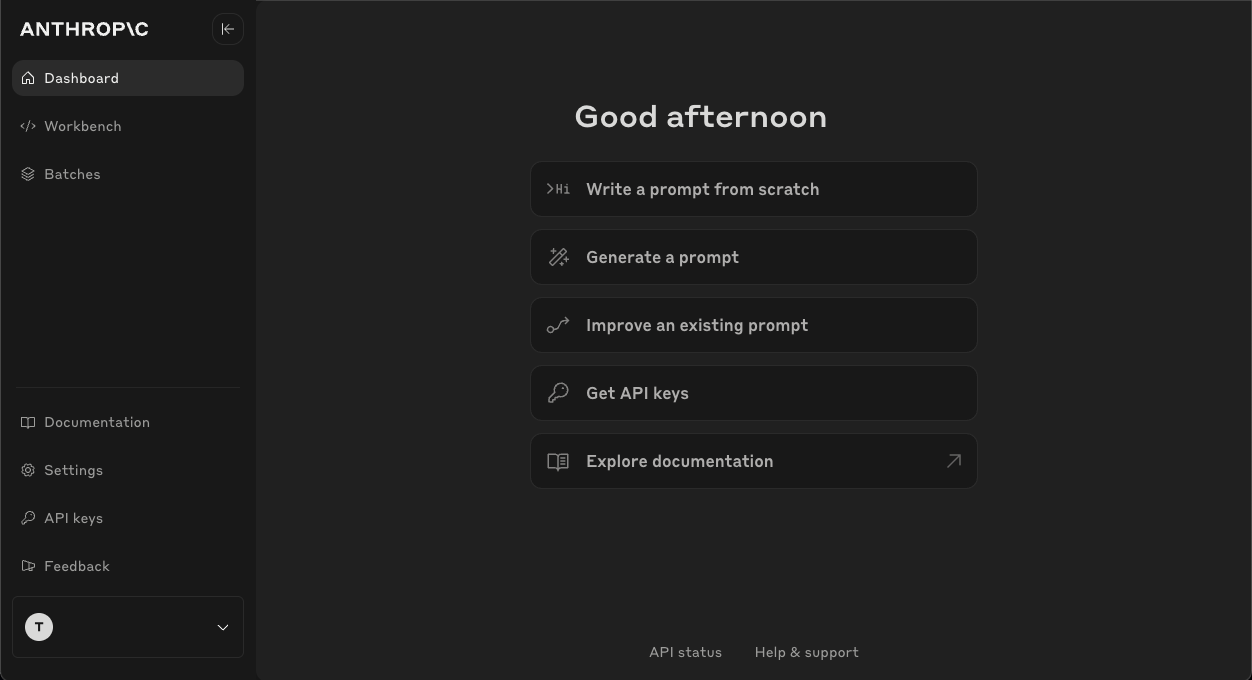
Start by logging into your Anthropic Console.
1. Sign in to your Anthropic account at [Anthropic](https://console.anthropic.com/dashboard).
 ## Step 2: Locate API keys
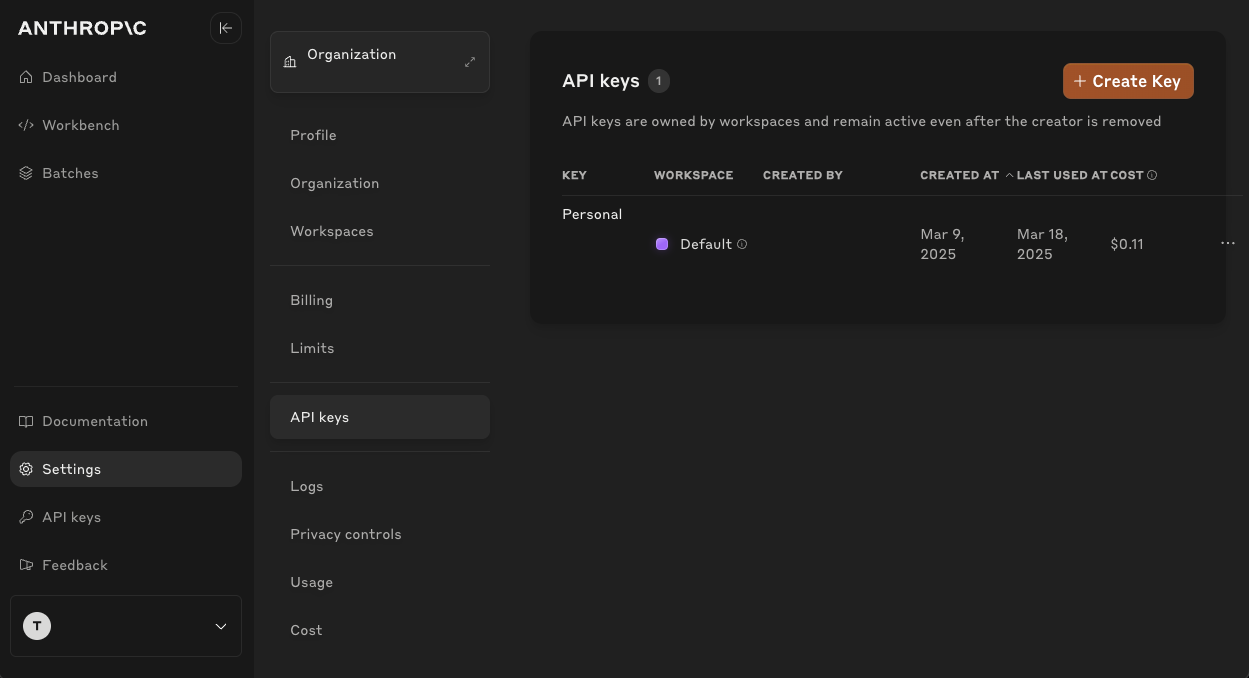
Once you're in the Anthropic, you'll find the necessary configuration details:
1. **API Key:**
* Click on "API keys" to view your API keys.
* If you haven't created an API Key before, click on "Create API key" to generate a new one. Make sure to copy the API Key as they are shown only once.
## Step 2: Locate API keys
Once you're in the Anthropic, you'll find the necessary configuration details:
1. **API Key:**
* Click on "API keys" to view your API keys.
* If you haven't created an API Key before, click on "Create API key" to generate a new one. Make sure to copy the API Key as they are shown only once.
 ## Step 3: Configure Anthropic Model Connector in Your Application
Now that you have gathered all the necessary details enter the following information:
* **API Key:** Your Anthropic API key.
## Sample Request and Response
**Request:**
```json theme={null}
{
"model": "claude-3-7-sonnet-20250219",
"max_tokens": 256,
"messages": [{"role": "user", "content": "Hi."}],
"stream": false
}
```
**Response:**
```json theme={null}
{
"id": "msg_0123ABC",
"type": "message",
"role": "assistant",
"model": "claude-3-7-sonnet-20250219",
"content": [
{
"type": "text",
"text": "Hello there! How can I assist you today? Whether you have a question, need some information, or just want to chat, I'm here to help. What's on your mind?"
}
],
"stop_reason": "end_turn",
"stop_sequence": null,
"usage": {
"input_tokens": 10,
"cache_creation_input_tokens": 0,
"cache_read_input_tokens": 0,
"output_tokens": 41
}
}
```
**Request:**
```json theme={null}
{
"model": "claude-3-7-sonnet-20250219",
"max_tokens": 1024,
"messages": [{"role": "user", "content": "Hi"}],
"stream": true
}
```
**Response:**
```json theme={null}
{
"type": "content_block_delta",
"index": 0,
"delta": {
"type": "text_delta",
"text": "Hello!"
}
}
```
## Step 3: Configure Anthropic Model Connector in Your Application
Now that you have gathered all the necessary details enter the following information:
* **API Key:** Your Anthropic API key.
## Sample Request and Response
**Request:**
```json theme={null}
{
"model": "claude-3-7-sonnet-20250219",
"max_tokens": 256,
"messages": [{"role": "user", "content": "Hi."}],
"stream": false
}
```
**Response:**
```json theme={null}
{
"id": "msg_0123ABC",
"type": "message",
"role": "assistant",
"model": "claude-3-7-sonnet-20250219",
"content": [
{
"type": "text",
"text": "Hello there! How can I assist you today? Whether you have a question, need some information, or just want to chat, I'm here to help. What's on your mind?"
}
],
"stop_reason": "end_turn",
"stop_sequence": null,
"usage": {
"input_tokens": 10,
"cache_creation_input_tokens": 0,
"cache_read_input_tokens": 0,
"output_tokens": 41
}
}
```
**Request:**
```json theme={null}
{
"model": "claude-3-7-sonnet-20250219",
"max_tokens": 1024,
"messages": [{"role": "user", "content": "Hi"}],
"stream": true
}
```
**Response:**
```json theme={null}
{
"type": "content_block_delta",
"index": 0,
"delta": {
"type": "text_delta",
"text": "Hello!"
}
}
```